
 A spinner, useful for indicating that some kind an operation is happening.
There are a couple default ones, but you can also pass your own ”frames.”
* [Example code, basic spinner](https://github.com/charmbracelet/bubbletea/tree/master/examples/spinner/main.go)
* [Example code, various spinners](https://github.com/charmbracelet/bubbletea/tree/master/examples/spinners/main.go)
## Text Input
A spinner, useful for indicating that some kind an operation is happening.
There are a couple default ones, but you can also pass your own ”frames.”
* [Example code, basic spinner](https://github.com/charmbracelet/bubbletea/tree/master/examples/spinner/main.go)
* [Example code, various spinners](https://github.com/charmbracelet/bubbletea/tree/master/examples/spinners/main.go)
## Text Input
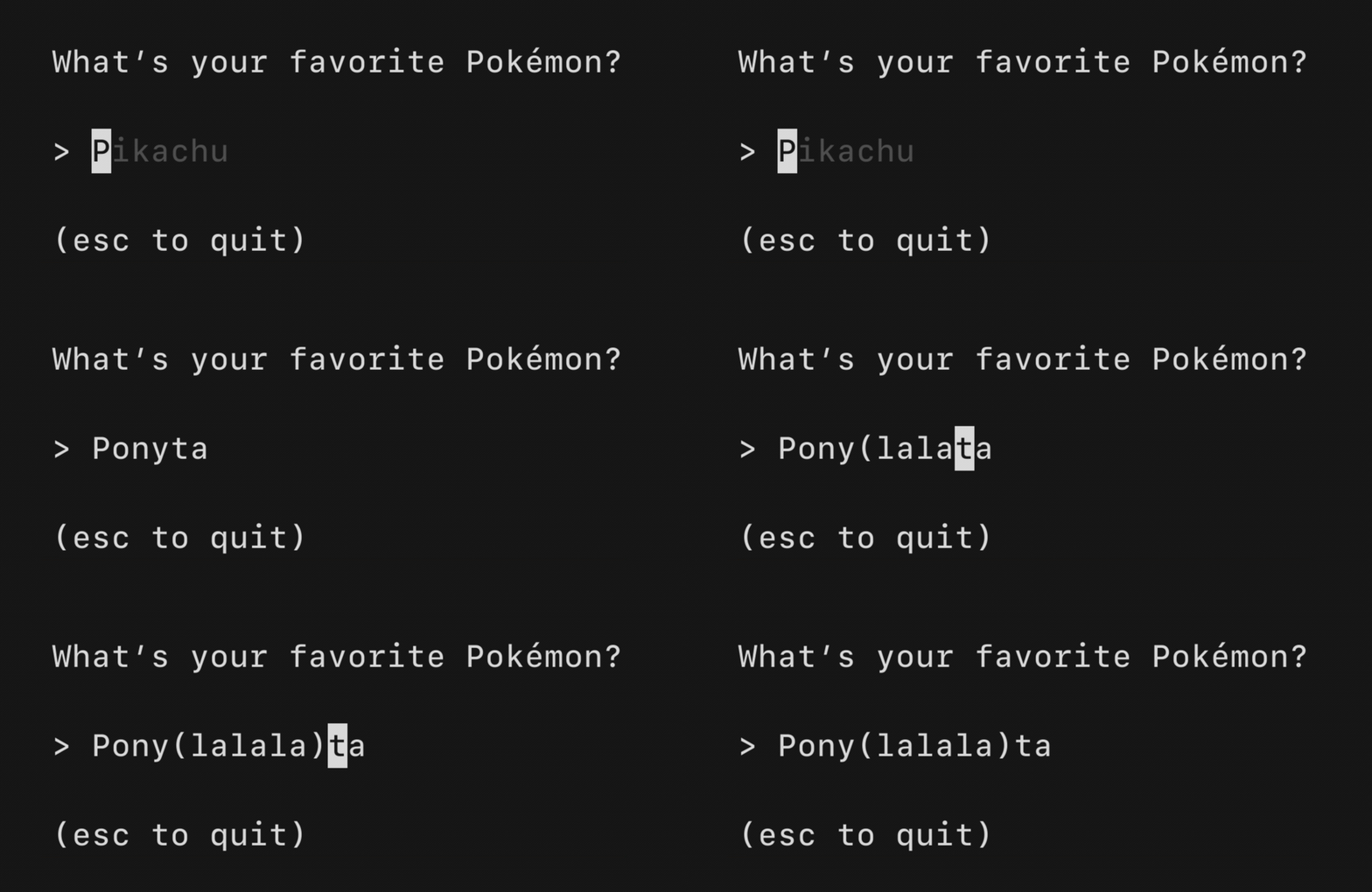 A text input field, akin to an `` in HTML. Supports unicode,
pasting, in-place scrolling when the value exceeds the width of the element and
the common, and many customization options.
* [Example code, one field](https://github.com/charmbracelet/bubbletea/tree/master/examples/textinput/main.go)
* [Example code, many fields](https://github.com/charmbracelet/bubbletea/tree/master/examples/textinputs/main.go)
## Text Area
A text input field, akin to an `` in HTML. Supports unicode,
pasting, in-place scrolling when the value exceeds the width of the element and
the common, and many customization options.
* [Example code, one field](https://github.com/charmbracelet/bubbletea/tree/master/examples/textinput/main.go)
* [Example code, many fields](https://github.com/charmbracelet/bubbletea/tree/master/examples/textinputs/main.go)
## Text Area
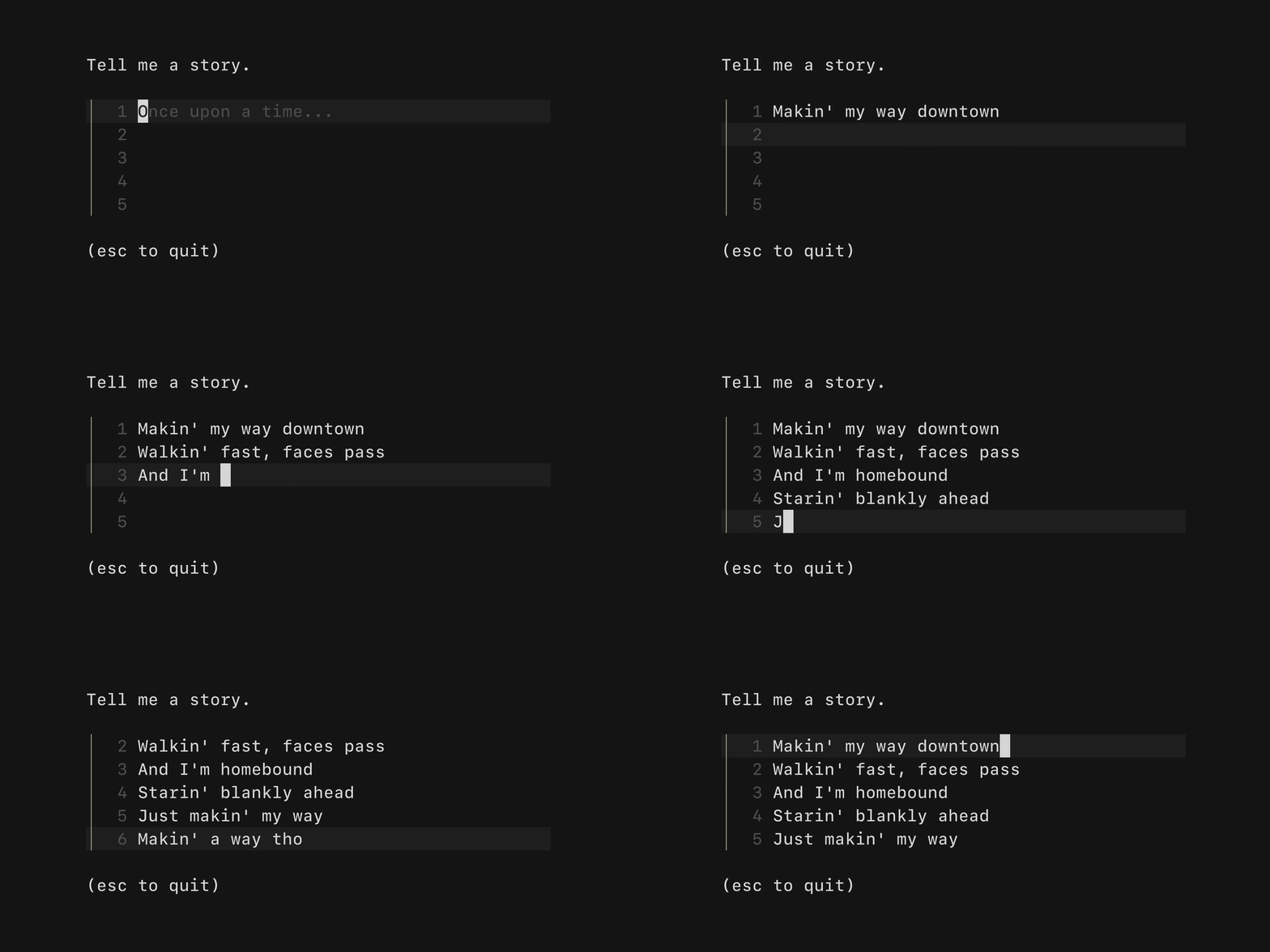 A text area field, akin to an `` in HTML. Allows for input that
spans multiple lines. Supports unicode, pasting, vertical scrolling when the
value exceeds the width and height of the element, and many customization
options.
* [Example code, chat input](https://github.com/charmbracelet/bubbletea/tree/master/examples/chat/main.go)
* [Example code, story time input](https://github.com/charmbracelet/bubbletea/tree/master/examples/textarea/main.go)
## Table
A text area field, akin to an `` in HTML. Allows for input that
spans multiple lines. Supports unicode, pasting, vertical scrolling when the
value exceeds the width and height of the element, and many customization
options.
* [Example code, chat input](https://github.com/charmbracelet/bubbletea/tree/master/examples/chat/main.go)
* [Example code, story time input](https://github.com/charmbracelet/bubbletea/tree/master/examples/textarea/main.go)
## Table
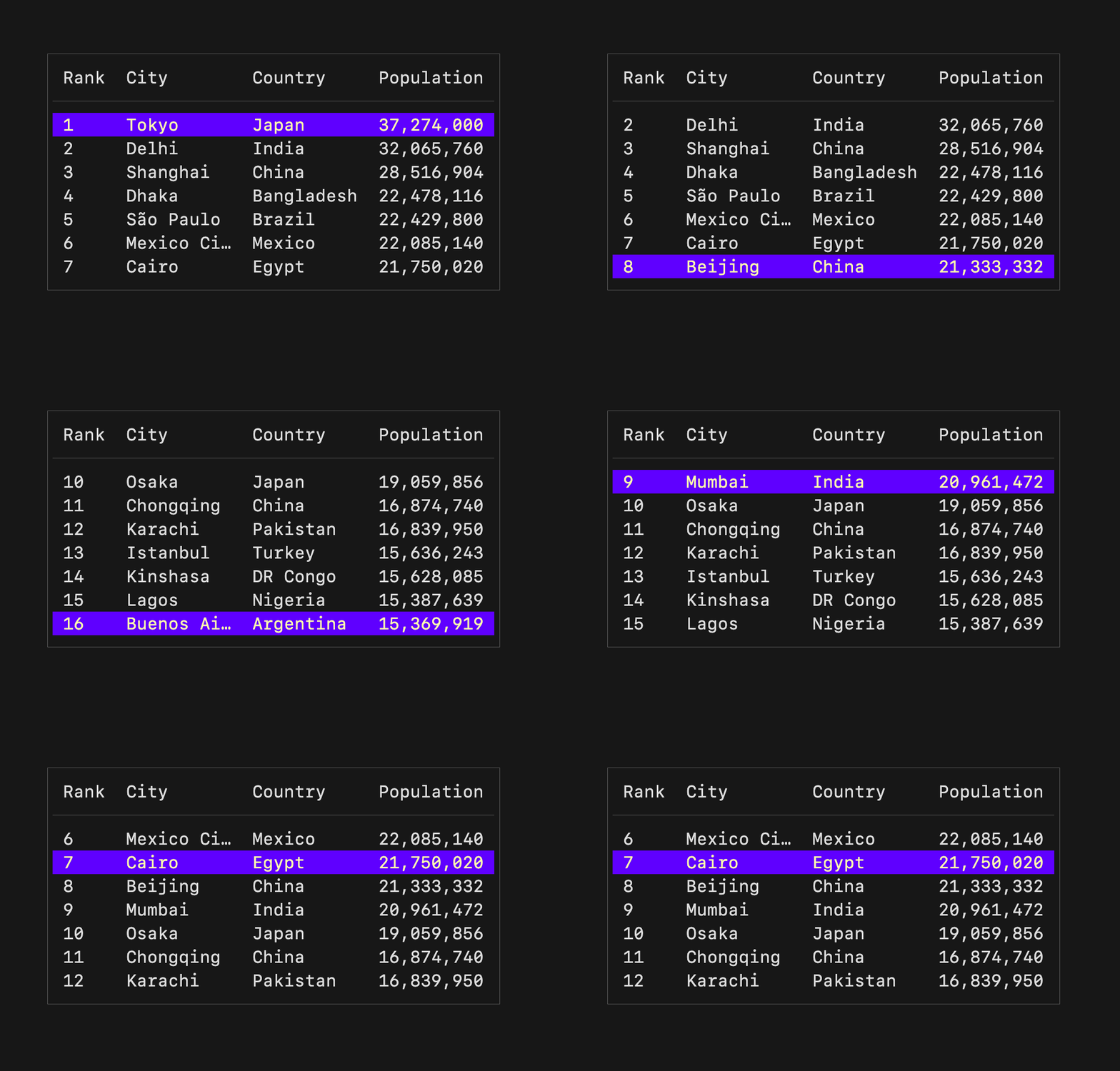 A component for displaying and navigating tabular data (columns and rows).
Supports vertical scrolling and many customization options.
* [Example code, countries and populations](https://github.com/charmbracelet/bubbletea/tree/master/examples/table/main.go)
## Progress
A component for displaying and navigating tabular data (columns and rows).
Supports vertical scrolling and many customization options.
* [Example code, countries and populations](https://github.com/charmbracelet/bubbletea/tree/master/examples/table/main.go)
## Progress
 A simple, customizable progress meter, with optional animation via
[Harmonica][harmonica]. Supports solid and gradient fills. The empty and filled
runes can be set to whatever you'd like. The percentage readout is customizable
and can also be omitted entirely.
* [Animated example](https://github.com/charmbracelet/bubbletea/blob/master/examples/progress-animated/main.go)
* [Static example](https://github.com/charmbracelet/bubbletea/blob/master/examples/progress-static/main.go)
[harmonica]: https://github.com/charmbracelet/harmonica
## Paginator
A simple, customizable progress meter, with optional animation via
[Harmonica][harmonica]. Supports solid and gradient fills. The empty and filled
runes can be set to whatever you'd like. The percentage readout is customizable
and can also be omitted entirely.
* [Animated example](https://github.com/charmbracelet/bubbletea/blob/master/examples/progress-animated/main.go)
* [Static example](https://github.com/charmbracelet/bubbletea/blob/master/examples/progress-static/main.go)
[harmonica]: https://github.com/charmbracelet/harmonica
## Paginator
 A component for handling pagination logic and optionally drawing pagination UI.
Supports "dot-style" pagination (similar to what you might see on iOS) and
numeric page numbering, but you could also just use this component for the
logic and visualize pagination however you like.
* [Example code](https://github.com/charmbracelet/bubbletea/blob/master/examples/paginator/main.go)
## Viewport
A component for handling pagination logic and optionally drawing pagination UI.
Supports "dot-style" pagination (similar to what you might see on iOS) and
numeric page numbering, but you could also just use this component for the
logic and visualize pagination however you like.
* [Example code](https://github.com/charmbracelet/bubbletea/blob/master/examples/paginator/main.go)
## Viewport
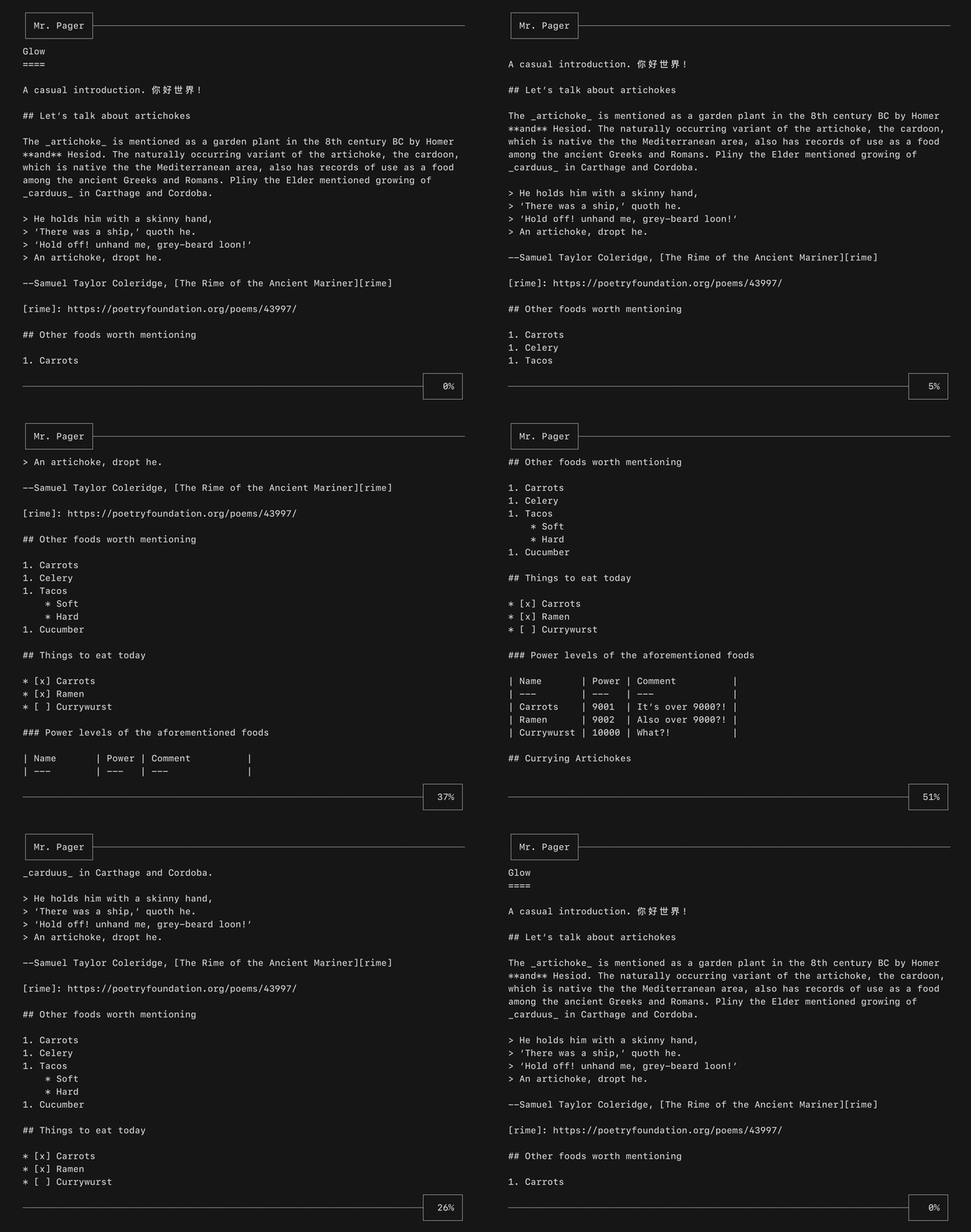 A viewport for vertically scrolling content. Optionally includes standard
pager keybindings and mouse wheel support. A high performance mode is available
for applications which make use of the alternate screen buffer.
* [Example code](https://github.com/charmbracelet/bubbletea/tree/master/examples/pager/main.go)
This component is well complemented with [Reflow][reflow] for ANSI-aware
indenting and text wrapping.
[reflow]: https://github.com/muesli/reflow
## List
A viewport for vertically scrolling content. Optionally includes standard
pager keybindings and mouse wheel support. A high performance mode is available
for applications which make use of the alternate screen buffer.
* [Example code](https://github.com/charmbracelet/bubbletea/tree/master/examples/pager/main.go)
This component is well complemented with [Reflow][reflow] for ANSI-aware
indenting and text wrapping.
[reflow]: https://github.com/muesli/reflow
## List
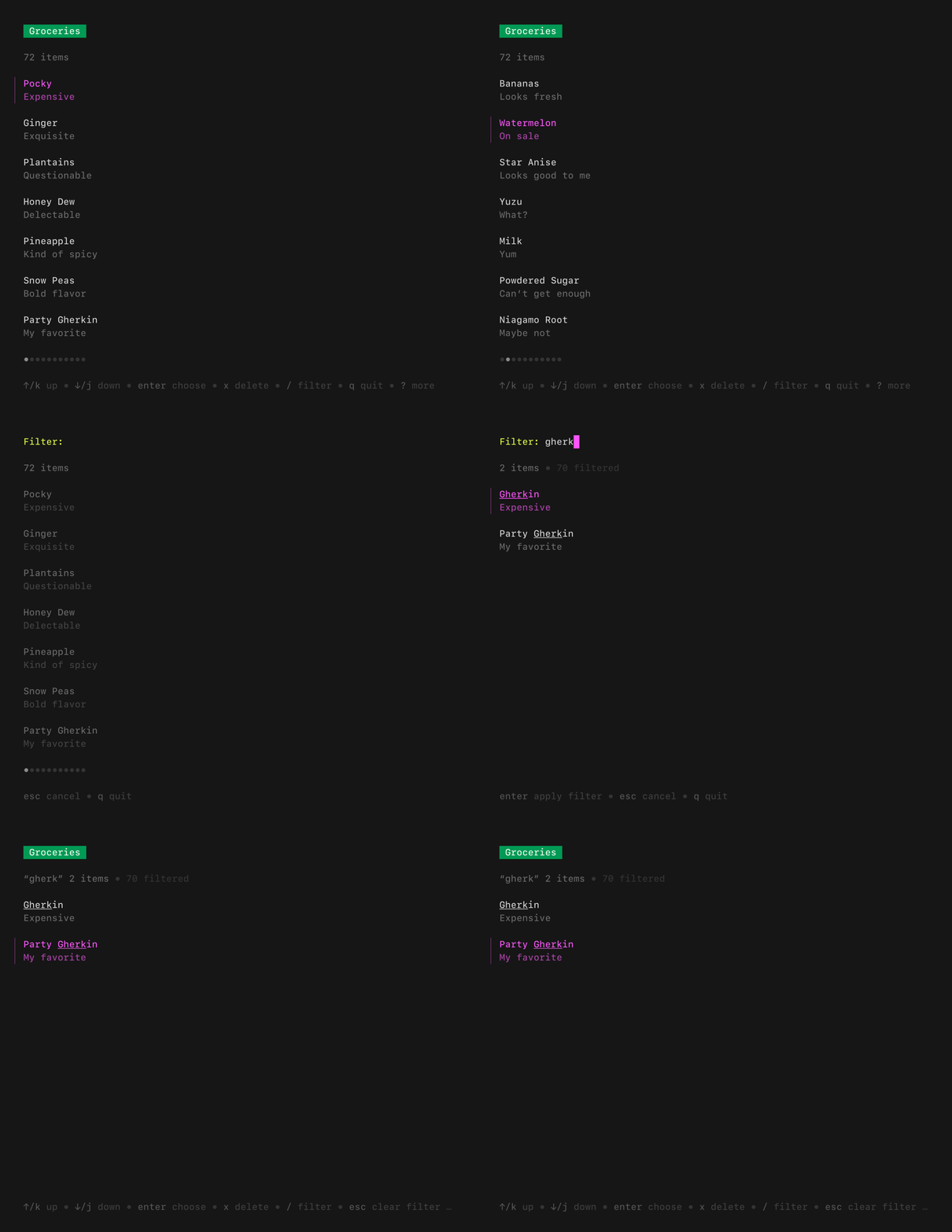 A customizable, batteries-included component for browsing a set of items.
Features pagination, fuzzy filtering, auto-generated help, an activity spinner,
and status messages, all of which can be enabled and disabled as needed.
Extrapolated from [Glow][glow].
* [Example code, default list](https://github.com/charmbracelet/bubbletea/tree/master/examples/list-default/main.go)
* [Example code, simple list](https://github.com/charmbracelet/bubbletea/tree/master/examples/list-simple/main.go)
* [Example code, all features](https://github.com/charmbracelet/bubbletea/tree/master/examples/list-fancy/main.go)
## File Picker
A customizable, batteries-included component for browsing a set of items.
Features pagination, fuzzy filtering, auto-generated help, an activity spinner,
and status messages, all of which can be enabled and disabled as needed.
Extrapolated from [Glow][glow].
* [Example code, default list](https://github.com/charmbracelet/bubbletea/tree/master/examples/list-default/main.go)
* [Example code, simple list](https://github.com/charmbracelet/bubbletea/tree/master/examples/list-simple/main.go)
* [Example code, all features](https://github.com/charmbracelet/bubbletea/tree/master/examples/list-fancy/main.go)
## File Picker
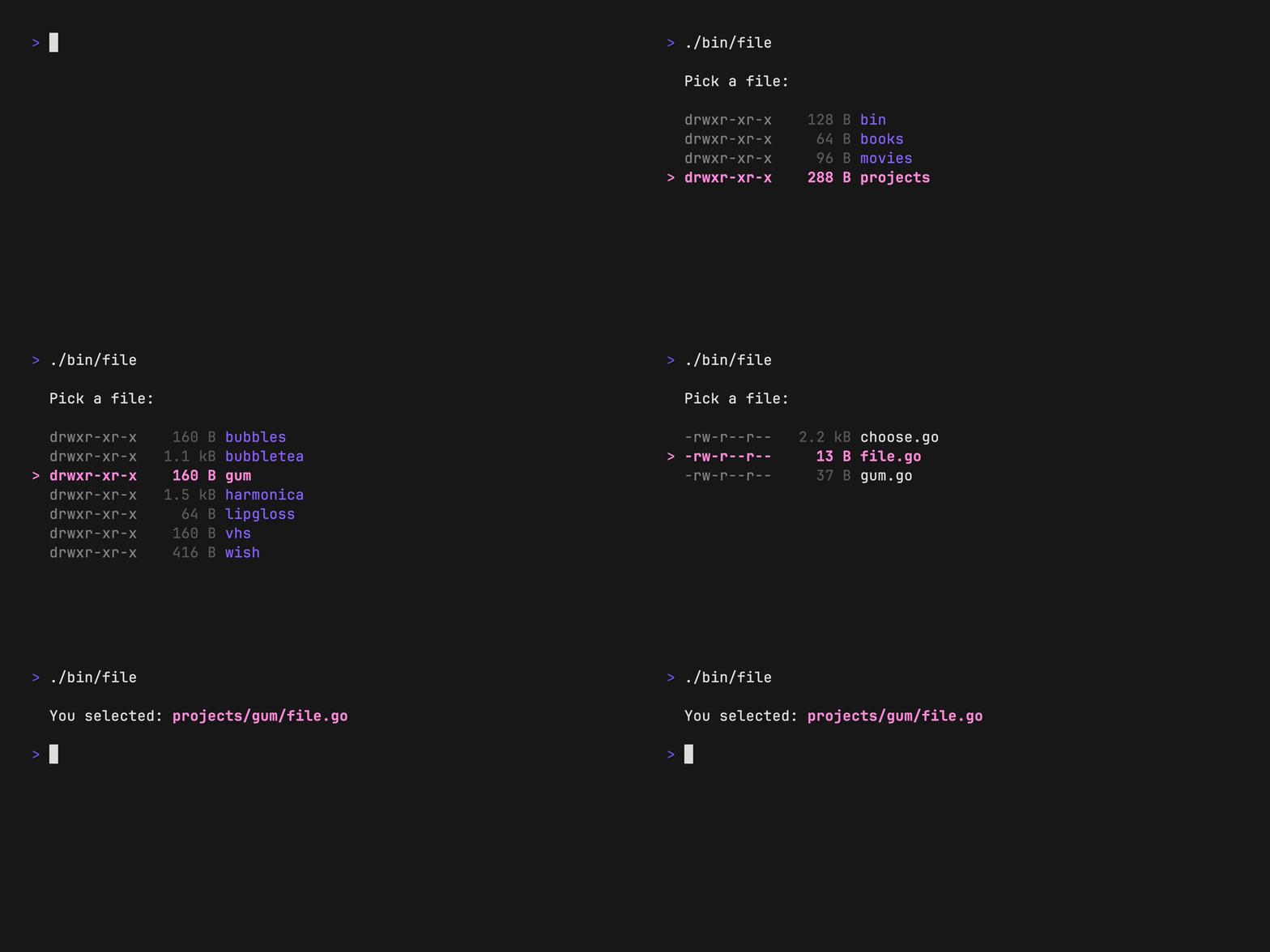 A customizable component for picking a file from the file system. Navigate
through directories and select files, optionally limit to certain file
extensions.
* [Example code](https://github.com/charmbracelet/bubbletea/tree/master/examples/file-picker/main.go)
## Timer
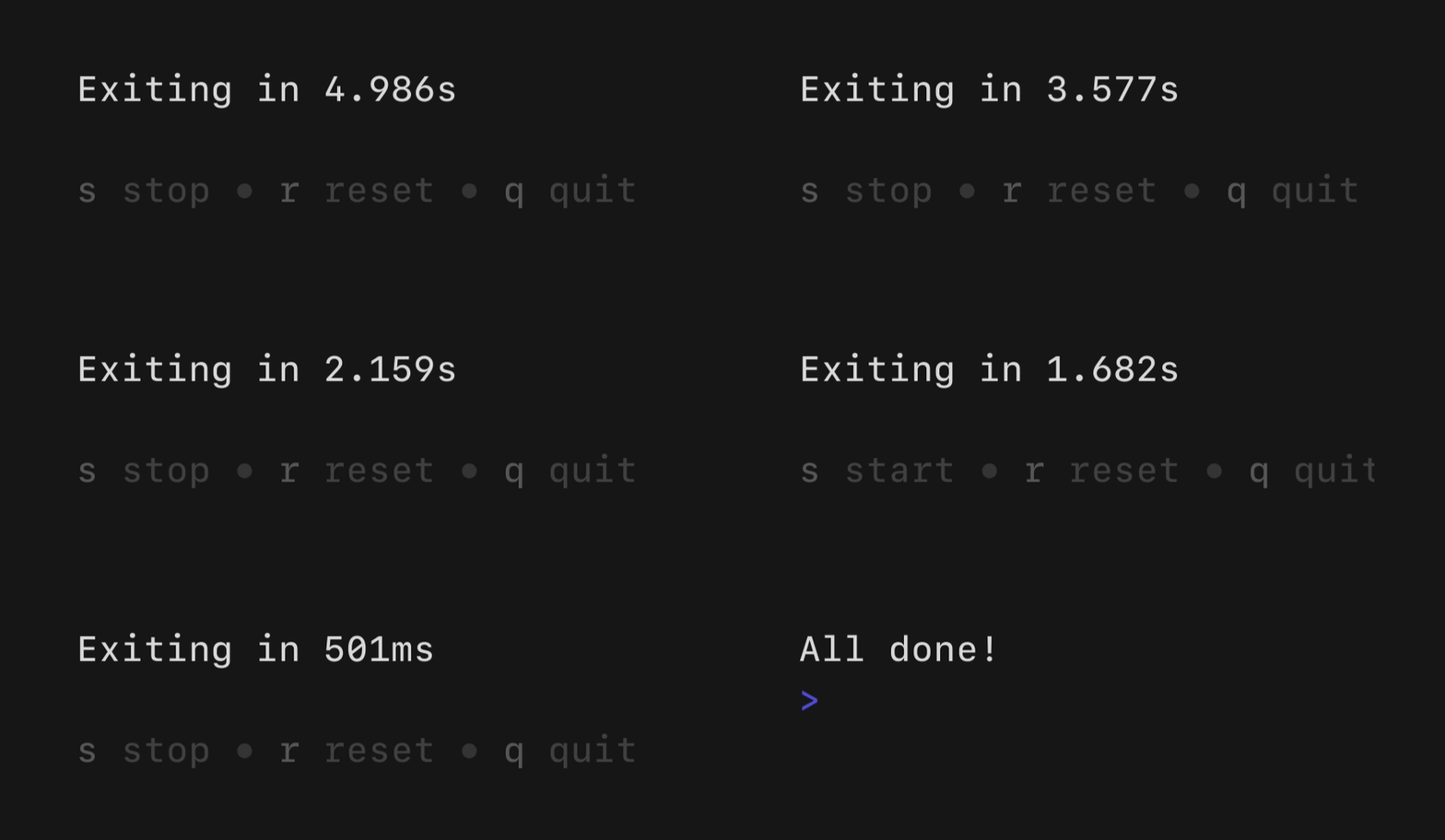
A simple, flexible component for counting down. The update frequency and output
can be customized as you like.
A customizable component for picking a file from the file system. Navigate
through directories and select files, optionally limit to certain file
extensions.
* [Example code](https://github.com/charmbracelet/bubbletea/tree/master/examples/file-picker/main.go)
## Timer
A simple, flexible component for counting down. The update frequency and output
can be customized as you like.
 * [Example code](https://github.com/charmbracelet/bubbletea/blob/master/examples/timer/main.go)
## Stopwatch
* [Example code](https://github.com/charmbracelet/bubbletea/blob/master/examples/timer/main.go)
## Stopwatch
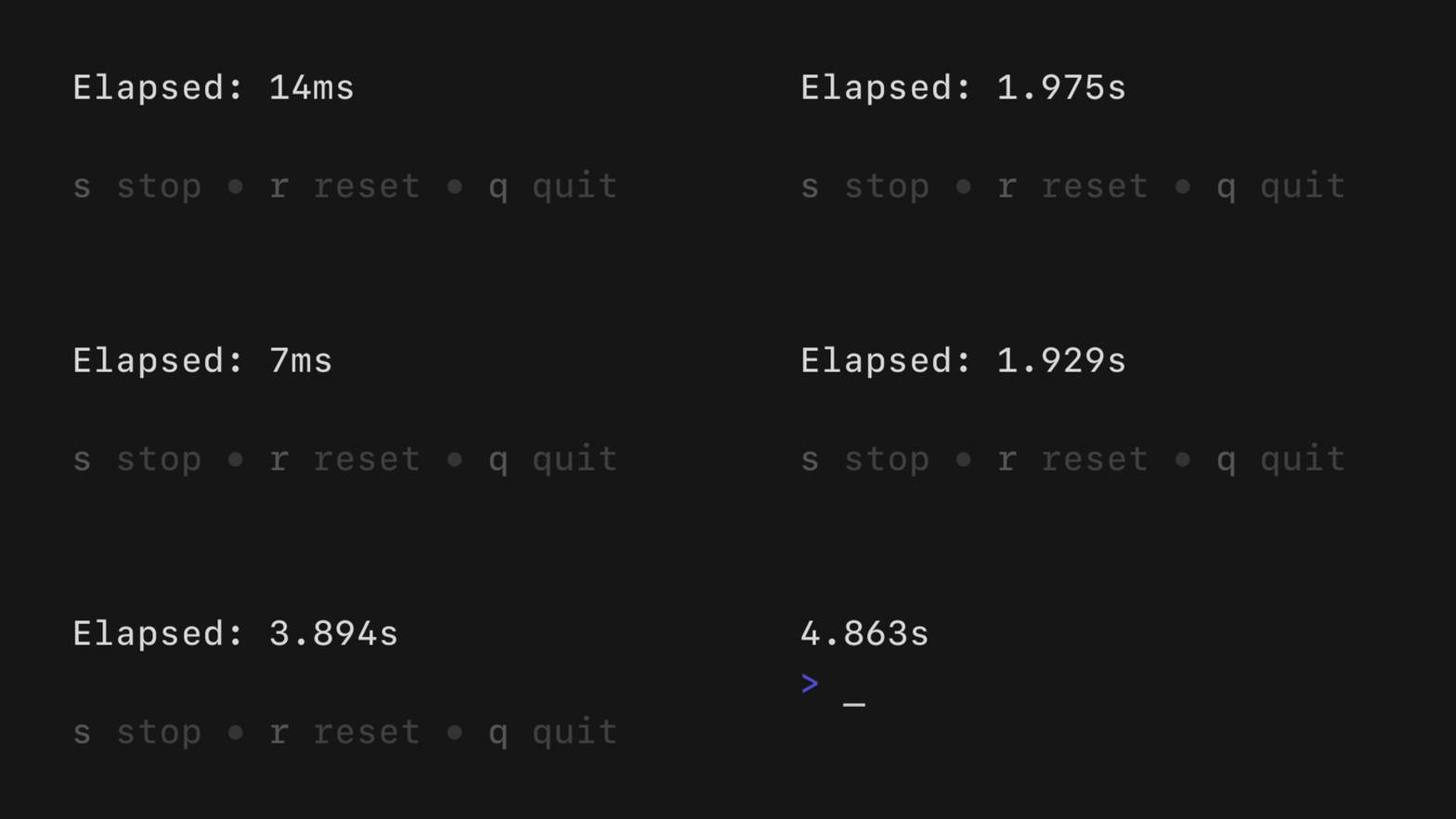 A simple, flexible component for counting up. The update frequency and output
can be customized as you see fit.
* [Example code](https://github.com/charmbracelet/bubbletea/blob/master/examples/stopwatch/main.go)
## Help
A simple, flexible component for counting up. The update frequency and output
can be customized as you see fit.
* [Example code](https://github.com/charmbracelet/bubbletea/blob/master/examples/stopwatch/main.go)
## Help
 A customizable horizontal mini help view that automatically generates itself
from your keybindings. It features single and multi-line modes, which the user
can optionally toggle between. It will truncate gracefully if the terminal is
too wide for the content.
* [Example code](https://github.com/charmbracelet/bubbletea/blob/master/examples/help/main.go)
## Key
A non-visual component for managing keybindings. It’s useful for allowing users
to remap keybindings as well as generating help views corresponding to your
keybindings.
```go
type KeyMap struct {
Up key.Binding
Down key.Binding
}
var DefaultKeyMap = KeyMap{
Up: key.NewBinding(
key.WithKeys("k", "up"), // actual keybindings
key.WithHelp("↑/k", "move up"), // corresponding help text
),
Down: key.NewBinding(
key.WithKeys("j", "down"),
key.WithHelp("↓/j", "move down"),
),
}
func (m Model) Update(msg tea.Msg) (tea.Model, tea.Cmd) {
switch msg := msg.(type) {
case tea.KeyMsg:
switch {
case key.Matches(msg, DefaultKeyMap.Up):
// The user pressed up
case key.Matches(msg, DefaultKeyMap.Down):
// The user pressed down
}
}
return m, nil
}
```
## Additional Bubbles
* [76creates/stickers](https://github.com/76creates/stickers): Responsive
flexbox and table components.
* [calyptia/go-bubble-table](https://github.com/calyptia/go-bubble-table): An
interactive, customizable, scrollable table component.
* [erikgeiser/promptkit](https://github.com/erikgeiser/promptkit): A collection
of common prompts for cases like selection, text input, and confirmation.
Each prompt comes with sensible defaults, remappable keybindings, any many
customization options.
* [evertras/bubble-table](https://github.com/Evertras/bubble-table): Interactive,
customizable, paginated tables.
* [knipferrc/teacup](https://github.com/knipferrc/teacup): Various handy
bubbles and utilities for building Bubble Tea applications.
* [mritd/bubbles](https://github.com/mritd/bubbles): Some general-purpose
bubbles. Inputs with validation, menu selection, a modified progressbar, and
so on.
* [treilik/bubbleboxer](https://github.com/treilik/bubbleboxer): Layout
multiple bubbles side-by-side in a layout-tree.
* [treilik/bubblelister](https://github.com/treilik/bubblelister): An alternate
list that is scrollable without pagination and has the ability to contain
other bubbles as list items.
If you’ve built a Bubble you think should be listed here,
[let us know](mailto:vt100@charm.sh).
## Feedback
We’d love to hear your thoughts on this project. Feel free to drop us a note!
* [Twitter](https://twitter.com/charmcli)
* [The Fediverse](https://mastodon.social/@charmcli)
* [Discord](https://charm.sh/chat)
## License
[MIT](https://github.com/charmbracelet/bubbletea/raw/master/LICENSE)
***
Part of [Charm](https://charm.sh).
A customizable horizontal mini help view that automatically generates itself
from your keybindings. It features single and multi-line modes, which the user
can optionally toggle between. It will truncate gracefully if the terminal is
too wide for the content.
* [Example code](https://github.com/charmbracelet/bubbletea/blob/master/examples/help/main.go)
## Key
A non-visual component for managing keybindings. It’s useful for allowing users
to remap keybindings as well as generating help views corresponding to your
keybindings.
```go
type KeyMap struct {
Up key.Binding
Down key.Binding
}
var DefaultKeyMap = KeyMap{
Up: key.NewBinding(
key.WithKeys("k", "up"), // actual keybindings
key.WithHelp("↑/k", "move up"), // corresponding help text
),
Down: key.NewBinding(
key.WithKeys("j", "down"),
key.WithHelp("↓/j", "move down"),
),
}
func (m Model) Update(msg tea.Msg) (tea.Model, tea.Cmd) {
switch msg := msg.(type) {
case tea.KeyMsg:
switch {
case key.Matches(msg, DefaultKeyMap.Up):
// The user pressed up
case key.Matches(msg, DefaultKeyMap.Down):
// The user pressed down
}
}
return m, nil
}
```
## Additional Bubbles
* [76creates/stickers](https://github.com/76creates/stickers): Responsive
flexbox and table components.
* [calyptia/go-bubble-table](https://github.com/calyptia/go-bubble-table): An
interactive, customizable, scrollable table component.
* [erikgeiser/promptkit](https://github.com/erikgeiser/promptkit): A collection
of common prompts for cases like selection, text input, and confirmation.
Each prompt comes with sensible defaults, remappable keybindings, any many
customization options.
* [evertras/bubble-table](https://github.com/Evertras/bubble-table): Interactive,
customizable, paginated tables.
* [knipferrc/teacup](https://github.com/knipferrc/teacup): Various handy
bubbles and utilities for building Bubble Tea applications.
* [mritd/bubbles](https://github.com/mritd/bubbles): Some general-purpose
bubbles. Inputs with validation, menu selection, a modified progressbar, and
so on.
* [treilik/bubbleboxer](https://github.com/treilik/bubbleboxer): Layout
multiple bubbles side-by-side in a layout-tree.
* [treilik/bubblelister](https://github.com/treilik/bubblelister): An alternate
list that is scrollable without pagination and has the ability to contain
other bubbles as list items.
If you’ve built a Bubble you think should be listed here,
[let us know](mailto:vt100@charm.sh).
## Feedback
We’d love to hear your thoughts on this project. Feel free to drop us a note!
* [Twitter](https://twitter.com/charmcli)
* [The Fediverse](https://mastodon.social/@charmcli)
* [Discord](https://charm.sh/chat)
## License
[MIT](https://github.com/charmbracelet/bubbletea/raw/master/LICENSE)
***
Part of [Charm](https://charm.sh).
 Charm热爱开源 • Charm loves open source